Self-hosted / Training dashboard
LOADOUT
Lifting and running. The whole week in view.
Hevy workouts and files from my watch, brought into one training history with the detail behind every load score.
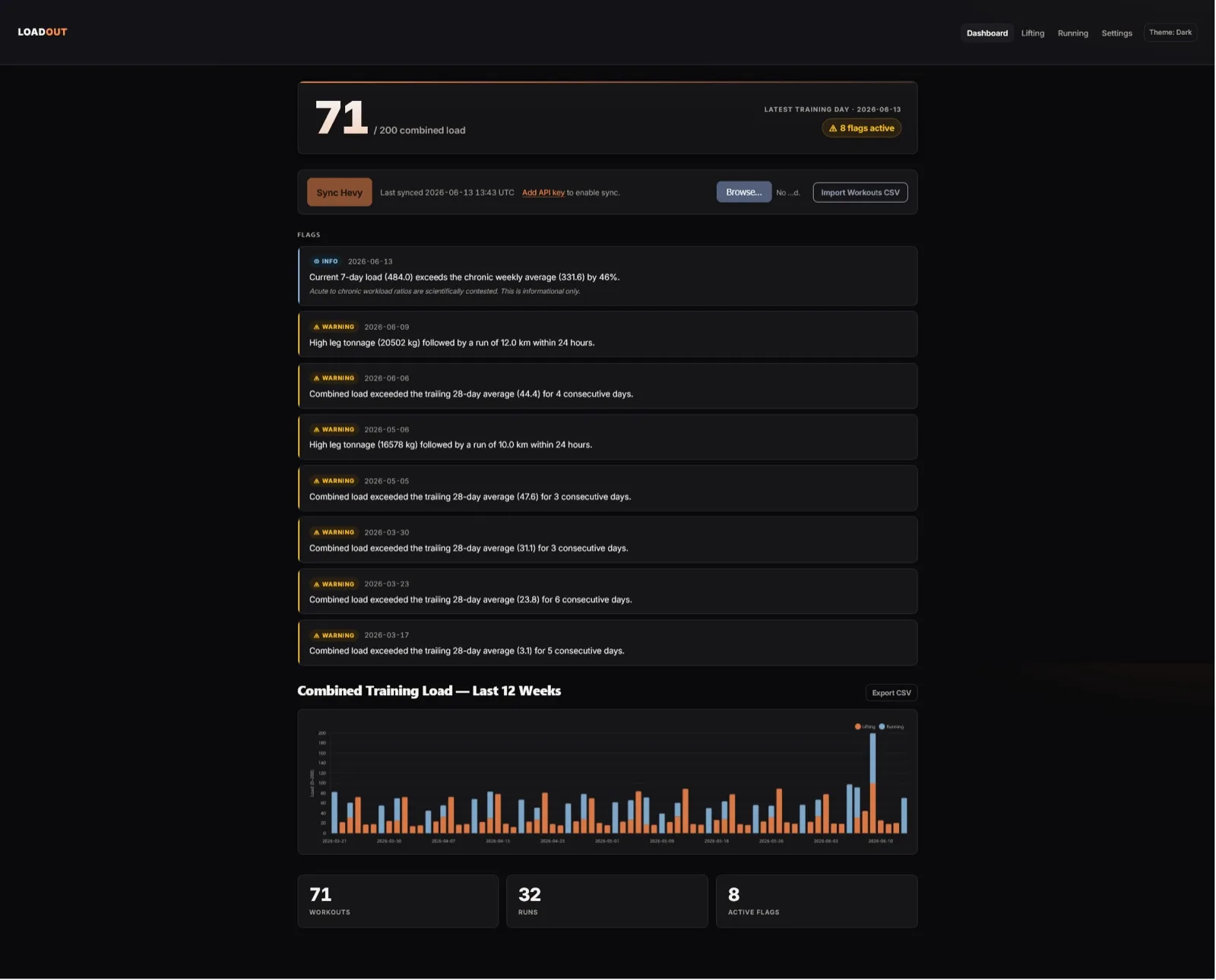
Hevy had my lifting history and my watch had my runs. I could look at either one, but neither showed the whole week. I built Loadout to bring both into one dashboard, with a combined training-load view and a way to look back at the lifting and running behind it.
The problem
A week can look ordinary in a lifting app and ordinary on a running watch while being busy across both. I wanted to see the activities together, including combinations such as a heavy leg session close to a long run.
The two sources describe different things. Lifting gives sets, reps and weight; running gives distance, duration and sometimes heart rate. Adding the raw numbers would produce a score with no useful meaning.
What I built
Loadout is a Flask app with SQLite storage and server-rendered pages. It syncs lifting sessions through the Hevy API and imports running files in GPX or FIT format. There is also a CSV import for lifting data.
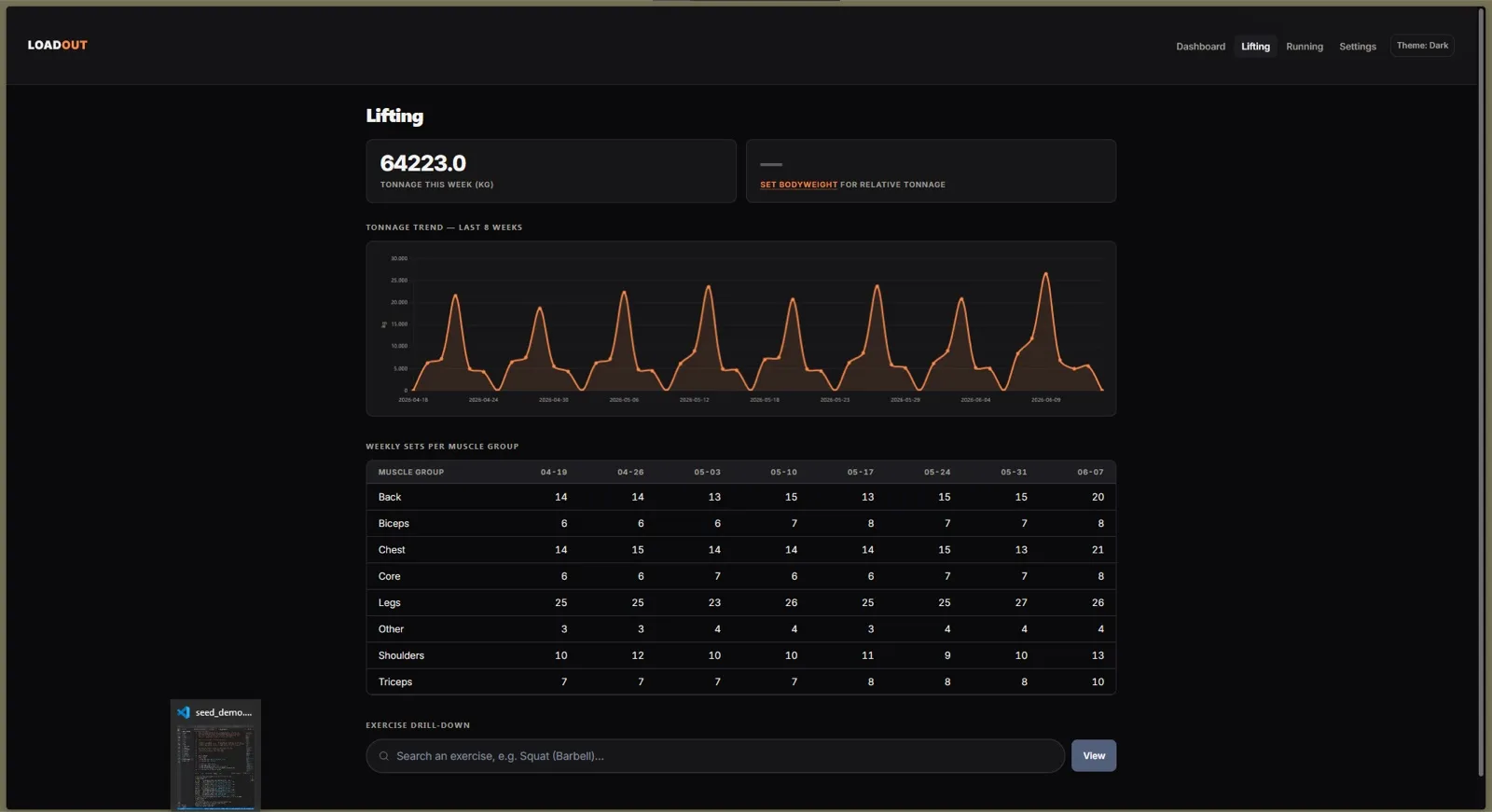
The main view shows a 12-week chart and flags that point to patterns worth inspecting. Separate lifting and running pages show the source details: weekly tonnage, sets by muscle group, distance and individual activities.
Chart.js handles the graphs. I kept the rest of the interface small so the work stayed focused on importing and combining the data.
Combining numbers without hiding their limits
Lifting load starts with tonnage: weight multiplied by reps across the day's sets. Leg tonnage is tracked separately. For runs with heart-rate data, the app uses a session-level TRIMP calculation; without it, it falls back to an estimate based on pace and duration.
Each activity type is normalised against its own trailing eight-week maximum before the two are added. That gives me a relative view of my history. It does not turn a tonne of lifting into a scientifically equivalent amount of running.
The load flags are informational. In particular, the seven-day versus 28-day load ratio is not presented as a validated injury prediction. The dashboard gives me something to inspect, not a decision about whether it is safe to train.
The small data decisions matter
Activities are assigned to a day in the timezone selected in Settings, rather than simply using the UTC date. A late session should stay on the day I trained. Changing the timezone recomputes the daily totals.
The computed loads are rebuilt after a sync or upload, so repeating the calculation gives the same result. The Hevy API credential is encrypted on disk. The default setup assumes one person on localhost, with optional Basic Auth for network access.
For running, I chose file imports so the app does not need another account connection. The extra upload step gives me a way to use files from different devices without building the core feature around another provider's API.
What I check and what remains rough
The tests cover the load calculations, flag rules, GPX parsing, route responses and parts of Hevy synchronisation. They include edge cases such as zero distance and unusual heart-rate values.
The FIT coverage is narrower: the checked-in tests reject invalid bytes, but a full round trip with a real FIT file is still a gap. The pace-based load estimate is also rougher than the heart-rate path.
Normalising against my own recent history makes the chart useful for comparison, but a big week after a quiet period will look like a spike. I keep the separate activity views available so the combined score never has to explain the week by itself.
Have a similar workflow?
I build dashboards that bring data from separate tools into one usable view. If your team is comparing exports by hand, write to me at luka@puhmeister.dev.